
AI Developer
@ai-developer
An AI developer that ships working software
The AI Developer is a senior product engineer that turns an idea into working software — an MVP app, website, Telegram bot, script, parser, or integration. It doesn't just write code: it agrees on a compact spec first, builds in thin verifiable slices, and proves the result works. Built for the Russian market: runs in rubles, no VPN, Windows-friendly, answers in Russian.
What it can do
- Spec an MVP. Clarify the idea, pick a minimal stack, sketch the architecture, break the work into tasks — before a single line of code.
- Build incrementally. Implement one slice at a time, read-before-edit, commit as a save point — the project stays runnable after every step.
- Test & debug. Write and run tests, check against the spec's acceptance criteria, and debug methodically (reproduce → localize → fix → guard).
- Track & remember. A project journal, a task checklist, and memory across sessions — so work resumes where it left off, not from scratch.
- Deploy. Publish the working MVP to the internet — free or cheap hosting, secrets via environment variables, verified by URL.
How it works
- Describe the idea — «хочу сделать…», «напиши ТЗ», «спроектируй архитектуру».
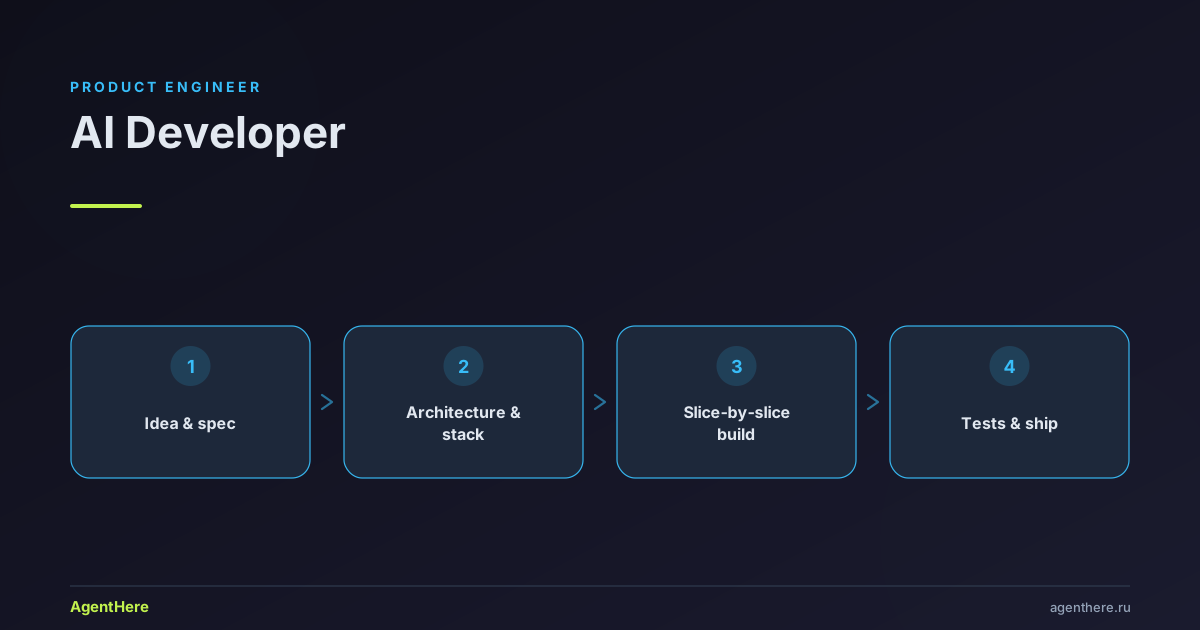
- The developer agrees a compact spec and a minimal stack with you (edits at the spec stage cost minutes; after code — hours).
- Builds in small slices you can check, and proves each step works.
- Saves progress to a journal, so you can pause and resume any time.
- Deploys the result — you get a shareable link.
Try it free — describe what you want to build.
Who the AI Developer is for
- Founders and startups — ship an MVP and test a hypothesis without a team or red tape: one core that delivers value.
- Solo experts and freelancers — a site, Telegram bot or script for your service, with no contractor hunt or waiting.
- Developers — a second pair of hands: spec, implement a feature, cover it with tests, debug methodically.
- Teams on Windows — a cross-platform build that runs under PowerShell too, with no Linux environment required.
What you can build
- An MVP app or website — structure, minimal stack, thin slices; the project stays runnable after every step.
- A Telegram bot — from the dialog flow to a working bot that takes commands, inline buttons and external integrations.
- A script or parser — automate routine, collect data, process files, run scheduled tasks.
- An integration — connect services: webhooks, data export and import, exchange over an API.
Related skills: spec & architecture, slice-by-slice build, test & debug.
How it works: spec before code
The core principle is "working first, pretty later." The AI Developer doesn't dive into code on a vague request: it agrees a compact spec first (goal + minimal stack + acceptance criterion), then builds in thin vertical slices and runs the project after each one. "Seems to work" is not an answer — a green test or "input X → output Y" is. Registration, profiles, settings and admin are deferred until the product's core works.
Cross-platform, memory and honest boundaries
- Windows-friendly: code runs on the user's machine, where Node is always present (bundled into the AgentHere desktop) but Python and bash may be missing. Helper scripts are Node-based, run commands go through
npm run, with no bash-specific tricks. - Memory across sessions: a project journal (status, decisions, what's next), a task checklist and persistent memory — stack, principled decisions, a project index. Work resumes where it stopped, not from scratch.
- Honest boundaries: never commits secrets and tokens, never edits
node_modules/,.venv/or generated code, never deletes a failing test and never leaves the project broken after a slice. Before a new dependency, a DB schema change or a CI edit — it asks.
For adjacent tasks — say, design a landing page for the finished product or creatives for the launch — pair the AI Developer with the AI Designer and the AI Marketer.
Ready to ship? Describe your idea — start a project with the AI Developer right now.
Does the AI Developer ship a finished MVP or just write code?
End to end: spec → implementation → verification. The project stays runnable after every slice, and the result is proven by a run or a test, not by the words "seems to work".
Does it work on Windows?
Yes. The code runs on the user's machine, where Node is always present (bundled into the AgentHere desktop) but Python and bash utilities may be missing. So helper scripts are Node-based, commands go through npm run, with no bash heredocs or && chains.
What does 'spec first' mean?
Before writing code, the developer agrees a compact spec with you: the goal, a minimal stack and an acceptance criterion. Edits at the spec stage cost minutes; after code they cost hours — so the spec always comes first.
Does the agent remember past sessions?
Yes. It keeps a project journal, a task checklist and persistent memory — the user's environment and stack, principled decisions, a project index. You can pause and resume where you left off, not from scratch.
Is it paid?
You can use the AI Developer within AgentHere's free tier — you only pay tokens for generation. See the pricing page for exact limits.